Last updated: Mar 2026
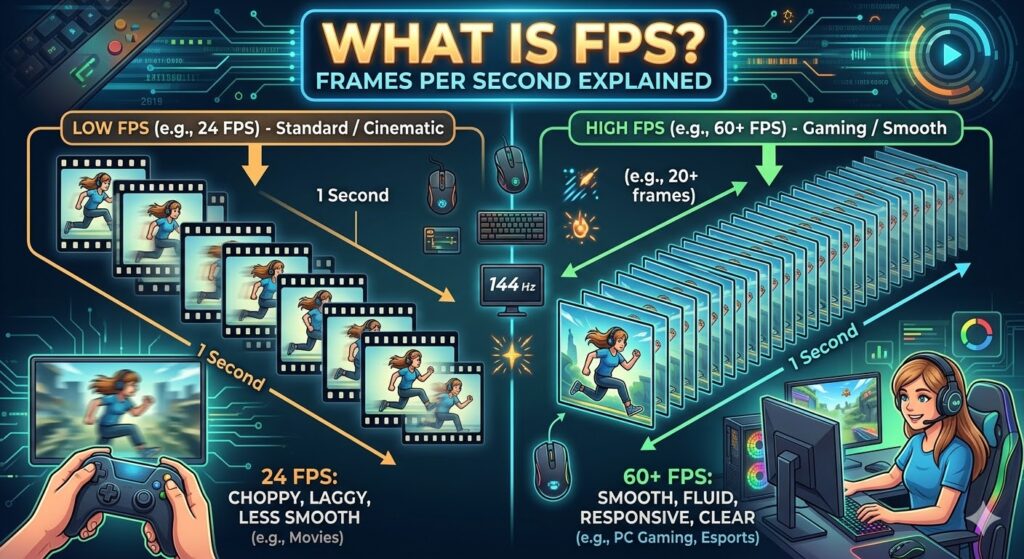
If you’ve ever spent time in a gaming lobby or browsed the specs of a new smartphone, you’ve likely encountered the term FPS. But what does it actually mean, and why is everyone so obsessed with making the number higher?
In this guide, we’ll break down the technical side of Frames Per Second, how it affects your experience, and what “golden number” you should be aiming for.
Defining FPS: The Science of Motion
FPS stands for Frames Per Second. At its core, it is a measurement of how many unique consecutive images (frames) a device displays within one second.
Our brains don’t actually see “video.” Instead, they interpret a rapid succession of still images as continuous motion. This is known as the persistence of vision. The more images shown in a single second, the smoother and more realistic that motion appears to the human eye.
How it Works
- Low FPS: Results in “choppy” or “stuttery” visuals. Think of a flipbook being turned slowly.
- High FPS: Results in fluid, life-like movement. Think of a high-end cinematic production or a professional esports match.
FPS in Gaming vs. Video
It’s important to distinguish between FPS in pre-recorded media and real-time rendered graphics.
1. Cinema and Television
Standard movies are typically filmed and projected at 24 FPS. This rate creates a slight “motion blur” that we traditionally associate with a “cinematic look.” Soap operas and news broadcasts often use 30 FPS or 60 FPS, which provides a sharper, more “live” feel.
2. Video Games
In gaming, FPS is dynamic. Your Graphics Processing Unit (GPU) calculates and renders each frame in real-time. Because the complexity of a game scene changes—moving from a quiet hallway to a massive explosion—your FPS can fluctuate. This is why gamers often use “FPS counters” to monitor performance.
Why Higher FPS Matters
While 24 FPS is fine for watching The Batman, it feels sluggish for playing Call of Duty. Here is why gamers push for higher numbers:
Reduced Input Lag
Input lag is the delay between pressing a button and seeing the action on screen. At higher frame rates, the time between frames is shorter. For example:
- At 60 FPS, a new frame appears every 16.67ms.
- At 144 FPS, a new frame appears every 6.94ms.
In competitive gaming, those milliseconds are the difference between winning a duel or losing it.
Improved Visual Clarity
When you turn your camera quickly in a game, low FPS causes the image to blur or “tear.” High FPS keeps the environment sharp, allowing you to track moving targets with much greater precision.
Common FPS Tiers: Which One Do You Need?
| FPS Tier | Experience Level | Best For |
| 30 FPS | Playable | Handheld consoles (Switch), older hardware, and cinematic RPGs. |
| 60 FPS | Smooth | The industry standard for modern consoles (PS5/Xbox Series X) and casual PC gaming. |
| 120 – 144 FPS | High Performance | Competitive shooters (Valorant, CS:GO) and high-end PC setups. |
| 240+ FPS | Extreme | Professional esports athletes and enthusiasts with 240Hz+ monitors. |
The Bottleneck: Refresh Rate (Hz)
It is a common misconception that having a high FPS is all that matters. You also need a monitor that can keep up. This is measured in Hertz (Hz).
If your PC is generating 120 FPS but your monitor is only 60Hz, you will only see 60 frames per second. The extra frames are “wasted,” and you might even experience screen tearing, where the monitor displays pieces of multiple frames at once.
How to Boost Your FPS
If your game feels like a slideshow, here are the quickest ways to improve your frame rate:
- Lower Resolution: Dropping from 4K to 1080p significantly reduces the load on your GPU.
- Update Drivers: Ensure your graphics card drivers are current.
- Adjust In-Game Settings: Turn down “Shadow Quality,” “Anti-Aliasing,” and “Volumetric Clouds.”
- Enable DLSS or FSR: Use AI upscaling technologies from NVIDIA or AMD to boost performance without sacrificing too much visual quality.
Conclusion
FPS is more than just a number; it’s the heartbeat of your visual experience. Whether you’re a casual player enjoying a story-driven adventure or a competitive pro looking for every advantage, understanding FPS helps you get the most out of your hardware.
Written By GGNoPay Team